
Tutorial
Create a Registry Backup
It's good practice to take a registry backup before running a regedit, or running any program which modifies registry settings, this way if you ever need to revert back to what you had previously you can do so easily!
Make a backup of your registry before installing settings!
Making the backup
- Click Start and type regedit and hit enter
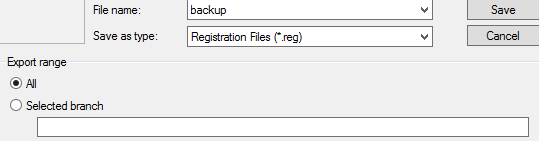
- In your registry on top left click File and then Export
- Save the backup file on your computer
Restoring from the backup
Simply double click on the registry file and click accept to any prompts that appear, then restart your PC. You have successfully restored to your previous settings!
Written by

Orilation